The Promise and Peril of ERP Software in Modern Enterprises
Stat to chew on: Panorama Consulting's 2026 ERP Report found that more than one-quarter of ERP projects went over budget, and almost one-quarter ran past their deadline.
Picture a Monday morning after go-live. Orders are stuck. Finance can't close the books. Your best people are asking why the old system was taken away. We've all heard a story like that, or lived one.
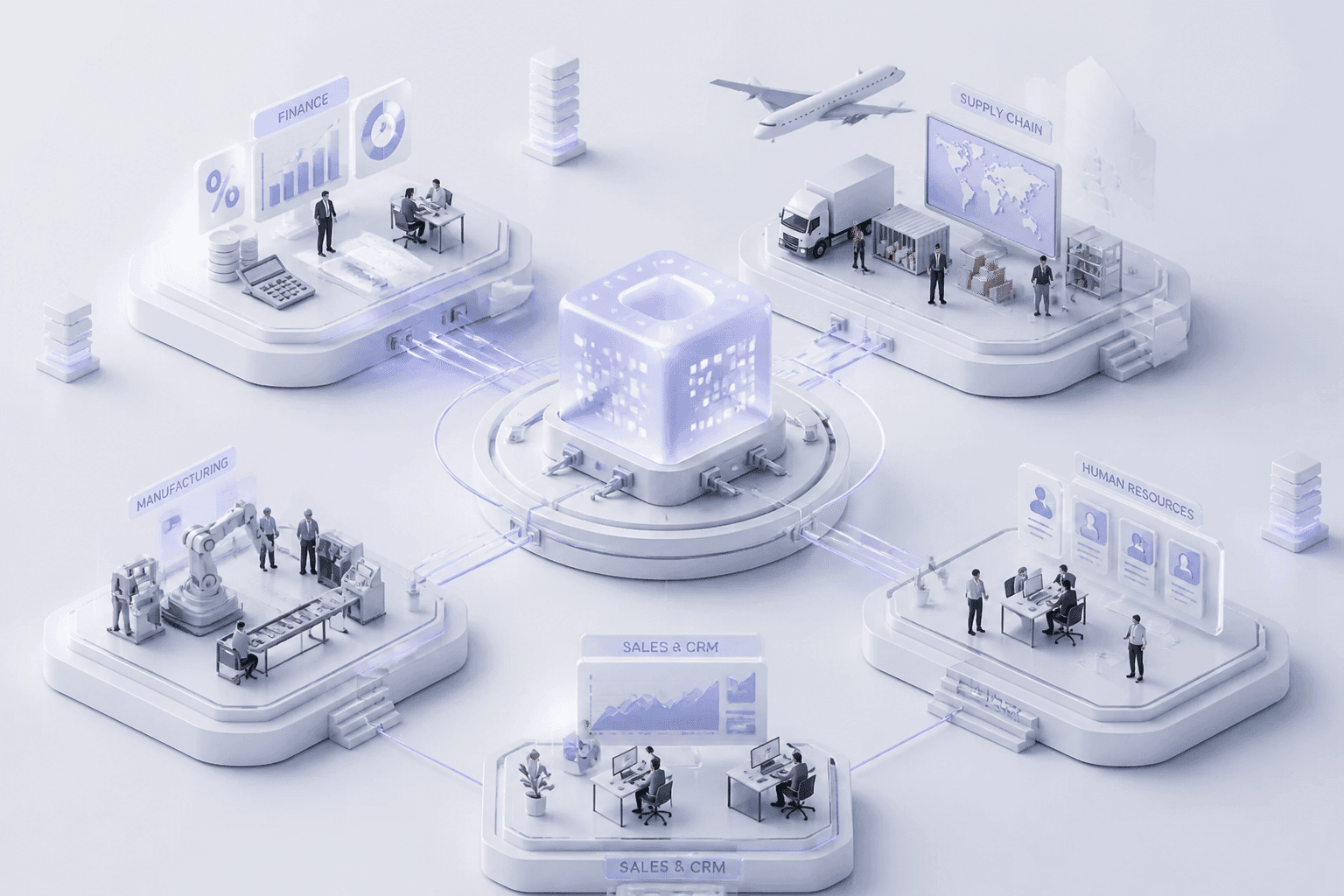
And yet, nobody buys ERP software hoping for chaos. The pitch is great, and honestly, it's true when things go right. One system for finance, supply chain, HR, and sales. Fewer spreadsheets. Cleaner data. Faster decisions. Digital Commerce 360 reported that 49% of manufacturers want cloud ERP to simplify their IT setup, and another 49% want to cut overall costs. Those are real goals, and enterprise resource planning systems can hit them.
Here's the catch. The software rarely fails on its own. Projects stumble because of messy data, fuzzy requirements, tired users, and budgets that were too hopeful from day one. Even the famous "70% of ERP projects fail" line is shaky, since failure can mean a missed budget, a missed date, or missed benefits. The Register's 2025 analysis put it this way: more than 70% of initiatives don't fully meet their original business-case goals, and about 25% fail badly. Either way, that's a lot of risk to carry.
So this guide is for CTOs, CIOs, and IT leaders who want a straight answer. We'll walk through the most common ERP implementation challenges, why they happen, and a practical framework to get ahead of them. No hype. Just what tends to work.
Let's start with where most projects go wrong: before anyone writes a single line of configuration.
Challenge 1: Inadequate Planning and Ambiguous Business Requirements

Here's a question I like to ask early: what exact problem is this ERP software supposed to fix? If the room goes quiet, or five people give five different answers, you've found your first risk.
Planning problems rarely look dramatic at the start. They look like a kickoff meeting that felt fine. But a 2026 failure review points to scope creep, poor data prep, weak change management and poor executive sponsorship as the usual suspects behind failed ERP implementation stories. Most of them trace back to the plan.
Skipping the Process Homework
This is the big one. Teams buy a system before they've written down how work actually happens today.
Map the real flows first. Order-to-cash. Procure-to-pay. Record-to-report. Note the manual workarounds and the weird exceptions that only Dana in accounting knows about (every company has a Dana). Then decide which processes should change and which truly need special handling. A readiness assessment guide from NetSuite lays out this kind of current-state review as a first step, before any vendor demo.
Without it, you end up forcing a system onto processes nobody understands. Or customizing everything to match habits you should've dropped.
Shopping for Features Instead of Fixes
Vendor demos are fun. Slick dashboards, clever AI helpers, a hundred modules. But a long feature list isn't a business case.
I've watched teams pick a platform because it "could do everything," then discover it didn't solve the two things that were actually hurting, like slow month-end close or bad inventory counts. So start with the pain. Write requirements as testable statements, split them into must-haves and nice-to-haves, and score vendors against that list. Not against the demo.
Hershey's 1999 rollout is the classic cautionary tale. According to one failure case study, it tried SAP R/3, Siebel CRM and Manugistics together, right before peak Halloween season. Reports say about $100 million in orders couldn't ship. Ambitious scope plus bad timing, and no room for error.
A Weak Project Charter
A charter is the one-page agreement that keeps everyone honest. When it's thin, trouble follows:
Scope grows after vendor selection, and nobody can say no.
Executives disagree on priorities, so the team gets mixed signals.
Nobody defined success, so "done" means whatever the loudest person says.
Here's what a solid plan should cover before you sign anything:
Element | What to define |
Scope | Modules, locations, legal entities, integrations, what's out of scope |
Stakeholders | Executive sponsor, steering group, process owners, decision rights |
Budget | Five-year TCO, internal time, and a contingency line |
Timeline | Phases, blackout periods, testing windows, cutover and rollback criteria |
KPIs | Baselines and targets, like days to close, inventory accuracy, on-time delivery |
If a row is empty, you're not ready yet. And that's fine. It's cheaper to find out now.
Buildera often sees this at the start of engagements: teams that need a neutral technical view of requirements before committing. Get the plan right, and the next hurdle, moving your data, gets a lot less scary.
Challenge 2: The Technical Minefield of Data Migration and Integration

Think of your legacy system as a packed attic. Nobody wants to haul it all into a new house without looking inside the boxes. Yet that's pretty much what happens in a lot of ERP software projects.
The Dirty Data Problem
Years of old records pile up. You get "Acme Corp" and "ACME Corporation Inc." as two different customers. Suppliers have no tax ID. Dates show up in three formats. Load all that into the new system and you've corrupted it before anyone logs in.
The numbers back this up. An analysis of 100 ERP projects found data quality issues in 85% of them. Migration was planned for 4 to 6 weeks and usually took 8 to 12. Plus, integration trouble delayed go-live in 47% of projects. And Oracle's migration white paper reports average overruns of 30% on cost and 41% on time for data migration projects. That's a big hit to the cost of ERP implementation before you've trained a single user.
Integration: Where the Web Gets Tangled
Your ERP doesn't live alone. It has to talk to your CRM, your e-commerce store, your supply chain tools, and that custom app someone built in 2011 (and then left the company). Every connection is a place where orders can vanish or numbers can disagree.
So how do you connect it all? Middleware platforms give you central monitoring, retries and ready-made connectors. Custom APIs give you tight control for high-volume or unusual flows. This middleware versus API comparison lays out the trade-offs well. Many teams end up with a mix of both. And if the old apps are too brittle to connect at all, legacy system modernization may need to happen first. Buildera sees that often with enterprise clients.
Risks in the Move Itself
The move has its own dangers. Records can get dropped. Downtime can run longer than planned. And data in transit is a security risk, especially when someone parks an extract in a spreadsheet on a laptop. Run mock migrations, encrypt everything, limit who can touch the files, and write down rollback criteria before cutover.
Here's a simple sequence that works:
Step | What happens | Why it matters |
1. Profile | Measure duplicates, blanks and bad formats in every source | You learn how messy things really are |
2. Cleanse | Fix and standardize records at the source | Bad data stops traveling |
3. Validate | Business owners check the cleaned data | The people who know the data approve it |
4. Map | Match each old field to a new field, with rules | Codes, units and currencies line up |
5. Migrate | Run trial loads, then the full load | Problems show up while they're cheap |
6. Reconcile | Compare counts, balances and key values | You prove nothing went missing |
Skip a step and you'll probably pay for it later. Data is only half the story, though, because people still have to use the system once it's clean.
Challenge 3: Overcoming Resistance: The Human Element of User Adoption

You can have clean data, a tight plan, and a flawless integration. And still watch the whole thing wobble because people won't use it. I've seen that happen. It stings.
ERP user adoption is where good projects quietly lose their value. Prosci's 2025 figure, as reported in a 2026 ERP statistics roundup, says one in five ERP implementations delivers less than 70% of its expected business benefits. The system works. The people just don't.
Why People Push Back
Resistance isn't random. It usually comes from three places:
Fear of redundancy. If the ERP automates invoice matching, the person who matches invoices all day starts sweating.
Disrupted workflows. Someone who has done a job the same way for 12 years has a rhythm. You just broke it.
No visible benefit. If the new system means more clicks for them and better reports for somebody else, why would they cheer?
None of that makes them difficult. It makes them human. So answer the question every user is silently asking: "What's in it for me?" Be honest about roles that will change, too. Silence feels worse than bad news.
Training That Comes Too Late (or Too Thin)
Here's a pattern that shows up again and again. A two-hour demo happens three days before go-live. Everyone nods. Then Monday arrives and nobody remembers which screen to use.
What happens next is predictable. Users click the wrong thing. Data goes in wrong. And then the spreadsheets come back, because Excel is familiar and the ERP feels like a maze. Those side processes are the workarounds that quietly wreck reporting and bring back the very silos you paid to remove.
A better approach:
Train by role, not by module.
Use short lessons (2 to 7 minutes) right before a task.
Give people a sandbox with real scenarios to practice in.
Name local champions who can answer questions in real time.
Track error rates and critical workflow completion, not class attendance.
For remote teams, in-app guidance tools can pop up help on the actual screen. That beats a 90-minute webinar nobody rewatches.
Sponsors and a Real Change Plan
A sponsor who sends one kickoff email isn't a sponsor. Visible means showing up to town halls, using the new dashboards in meetings, and saying no to side spreadsheets. When the boss uses the system, everyone notices.
Then pair that with a change framework. ADKAR works well because it shows you exactly where each person is stuck:
Stage | The question | What to do for ERP |
Awareness | Why are we changing? | Share the business problem and the cost of doing nothing |
Desire | Do I want to take part? | Explain role impact, answer "what's in it for me," use respected peers |
Knowledge | Do I know how? | Role-based training, short lessons, searchable how-to videos |
Ability | Can I do it under real pressure? | Sandbox practice, floor-walkers, quick-fix office hours |
Reinforcement | Will it stick? | Retire old tools, track usage, celebrate wins, fix pain points fast |
One secondary case reported 87% system use 90 days after go-live using ADKAR check-ins at weeks 4, 8, and 12. It's not an audited benchmark, but the habit of checking in is worth copying.
That covers the people side. Now for the part that makes finance leaders lose sleep: where the money actually goes.
Challenge 4: The Budget Black Hole: Controlling Total Cost of Ownership (TCO)
The license fee is the number everybody remembers. It's also the smallest surprise on the invoice. Ask any finance lead who has lived through an ERP software rollout, and they'll tell you the real bill showed up later, in pieces.
Where the Money Actually Goes
There's no universal split, since cloud versus on-premise and heavy customization change everything. But Captivix's cost formula gives a handy planning range, and it matches what I see in most five-year budgets:
Cost bucket | Typical share of TCO |
Software licenses or subscriptions | 15 to 25% |
Implementation and consulting | 25 to 35% |
Customization and integration | 10 to 20% |
Infrastructure and hosting | 5 to 15% |
Data migration and cleansing | 5 to 10% |
Training and change management | 5 to 10% |
Ongoing support and upgrades | 10 to 20% |
The ranges overlap because vendors label things differently. Also, don't forget your own people. Internal staff time and backfill are real money, even when nobody sends an invoice. And timing matters: ERP Research's TCO model says 45 to 65% of lifetime cost lands in year one.
Scope Creep: Death by a Thousand "Quick Adds"
Here's how overruns usually start. A VP asks for one more report. Sales wants a custom approval step. Someone in operations remembers a legacy workflow. Each request sounds tiny. Together? They can wreck a budget.
The numbers vary by study (some say 30% of projects run over, others say nearly half). First National Capital's 2025 research put it at 45%. Either way, it's common. The fix isn't saying no to everything. It's a change-control board where every request shows its business value and its lifecycle cost, including what it does to future upgrades. Plus, hold a contingency of 15 to 25%, which 2026 implementation guidance recommends, under steering committee control. Not in a project manager's back pocket.
The Long Tail of a Bad Fit
Cheap choices get pricey. An ill-fitting platform, or an under-funded implementation, leaves you with heavy workarounds, brittle custom code, and rising support bills. That's technical debt, and it compounds quietly for years.
Some teams discover this when upgrades keep breaking their customizations. Others hit it when the ERP can't talk to newer tools. Buildera often helps enterprises untangle exactly this, through legacy system modernization and cleaner integration layers. Fixing it later costs far more than budgeting honestly now.
So with money under control, what does a smart plan look like? Let's put the pieces together.
A Strategic Framework for De-Risking Your ERP Adoption

We've covered what goes wrong. Now let's talk about what to do about it. I don't have a magic fix (nobody does), but a simple three-phase approach, backed by solid governance and the right partner, cuts a lot of risk.
Three Phases That Keep Risk Small
Phase 1: Discovery and business process analysis. Don't sign a big contract yet. Pay for a short discovery first. Map your real workflows, profile your data, list your integrations, and write down the business case with numbers. A few weeks here can expose migration and integration surprises before they turn into expensive change orders.
Phase 2: Agile, phased implementation. Roll out by business unit, region or module instead of flipping one giant switch. According to Panorama's 2025 ERP Report, fewer than one-quarter of surveyed organizations went big bang, and most multinational respondents phased it. Smaller waves mean a smaller blast radius. Lessons from wave one improve wave two.
There's a catch, though. Phasing can mean temporary integrations and running two systems side by side for a while. That costs something. Budget for it.
Phase 3: Continuous improvement. Go-live isn't the finish line. Track active use by role, error rates, close times and inventory accuracy. Review them every quarter. Retire old spreadsheets. Add modules or smarter automation only when the data underneath is trustworthy.
Here's how the two approaches compare:
Factor | Traditional ERP Rollout | Modern Phased Implementation |
Risk | Concentrated in one cutover; a failure hits the whole company | Spread across waves; problems stay contained |
Time to value | Benefits arrive after the entire program ends | First benefits show up after wave one |
User disruption | Everyone changes at once, training is a crunch | Smaller groups, focused training and support |
Flexibility | Scope is locked early, changes are painful | Feedback shapes later waves, scope can adjust |
Hidden cost | Fewer temporary integrations, but high stakes | Some duplicate work and parallel processes |
Governance From Day One
A steering committee that meets once and disappears isn't governance. It needs real power. Put finance, operations, IT, HR and sales leaders in the same room, and give them clear decision rights over scope, design exceptions and contingency spending.
A practitioner's account of rescuing a failing ERP project shows the pattern. The team added a senior steering committee, cross-functional subject matter experts, weekly status meetings and data owners for migration templates. Issues finally had somewhere to go. (It's one write-up, not an audited study, so treat it as a useful pattern, not proof.)
A few things to set up early:
Escalation thresholds, so executives hear about risks before they blow up
Stage gates for design, testing, migration and cutover
Named owners for every major data domain
One shared view of schedule, budget, defects and risks
Picking a Partner, Not Just a Reseller
A reseller sells licenses and often configures standard modules. That's fine for a plain deployment. But if you've got legacy apps, odd integrations or high transaction volumes, you need engineers who can design, build, test and secure the technology around the ERP.
Ask direct questions. Who are the named architects? Who owns the integration code? How do they decide between configuring and customizing? A guide to choosing an ERP implementation partner is a decent starting checklist. Look for deep experience with both modern platforms and legacy system modernization, because that's where many ERP integration issues begin. Buildera's work in custom engineering and modernization is built around that kind of problem.
So what happens once the system is live and stable? That's where the real payoff starts.
From Challenge to Competitive Advantage: Making Your ERP a Growth Engine
Let's step back for a second. Planning gaps, messy data, tired users, and runaway costs sound like four separate headaches. They're really one story. Every one of them is fixable if you see it coming.
So here's the short version. Write down the real problem before you shop. Clean your data before you move it. Train people in small, timely bites, and give them a reason to care. Then budget for the full five years, with a contingency that someone senior actually controls. None of this is fancy. It's just discipline.
And that's the point. A good ERP rollout isn't an IT project with a software logo on it. It's a business change that needs three things working together: clear strategy, solid engineering, and honest change management. Miss one and the other two struggle.
Looking ahead, the stakes are going up. Gartner's forecast, reported by CFOtech says embedded AI in cloud ERP could help finance teams close the books 30% faster by 2028. That's a real prize. But AI only works on data you can trust, and on people who'll actually use it. So the groundwork you do now pays off twice.
I'll admit I don't have a crystal ball. What I do know is that teams who treat ERP software as a growth engine, not a box to tick, tend to come out ahead.
Ready to turn your ERP software from a challenge into a strategic asset?
Buildera helps CTOs, CIOs, and IT leaders plan smarter, modernize legacy systems, and build the integrations that keep ERP projects on track. Talk to our experts about your legacy modernization and digital transformation roadmap.
Ready to build software that actually works for your business?
Free discovery call · 15 minutes · No obligation